
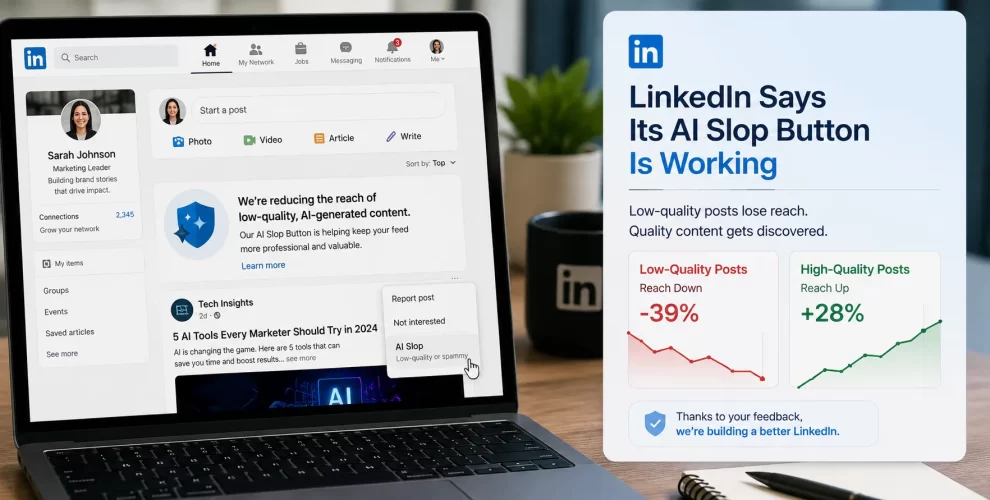
LinkedIn Says Its AI Slop Button Is Working as Low-Quality Posts Lose Reach
Table of Contents
LinkedIn Says Its AI Slop Button Is Working as Low-Quality Posts Lose Reach
LinkedIn says its recent effort to reduce low-quality AI-generated posts is already making a noticeable difference.
The platform introduced a “Seems like AI slop” reporting option on July 30, allowing members to flag posts they believe are generic, repetitive, or produced with little meaningful human input. Just a few weeks later, LinkedIn says more than one million people have used the button.
More importantly, LinkedIn says users are now seeing 40% fewer views of content its systems classify as AI slop compared with a few weeks earlier.
Key Takeaways
- LinkedIn introduced its “Seems like AI slop” reporting option on July 30, 2026.
- More than 1 million users have already clicked it.
- LinkedIn says visibility of content it identifies as AI slop has dropped by around 40%.
- The company is also using improved classifiers to detect low-quality AI content.
- LinkedIn removed its AI-powered “Enhance your post” feature.
- A simpler proofreading option is replacing it to help preserve the writer’s own voice.
- Authors may now receive feedback when members flag their posts as appearing AI-generated.
What Is LinkedIn’s AI Slop Button?
LinkedIn’s AI slop button gives users a direct way to report content that appears to be low-effort AI output.
The option appears in the three-dot menu on a LinkedIn post and is labeled “Seems like AI slop.” LinkedIn introduced it after acknowledging growing concerns about generic AI-generated material filling professional feeds.
LinkedIn describes AI slop as low-effort AI-generated material that may look polished but offers little original perspective or substance.
Is LinkedIn’s AI Slop Button Actually Working?
According to LinkedIn, yes.
Chief Product Officer Hari Srinivasan says members are now experiencing 40% fewer views on content LinkedIn classifies as AI slop compared with only a few weeks earlier.
The reporting feature isn’t working alone. LinkedIn has also improved the automated classifiers it uses to recognize suspicious or low-quality content.
User reports can provide another signal that helps LinkedIn understand what people consider unhelpful AI-generated material.
How Many People Have Reported AI Slop?
LinkedIn says more than one million people have already used the reporting option.
That is significant considering the feature was only introduced at the end of July.
It also suggests that users are actively noticing and reacting to AI-generated posts in their professional feeds.
The problem had already attracted attention before LinkedIn introduced the feature. AI-detection company Pangram previously estimated that 41% of long-form LinkedIn posts it analyzed were likely fully AI-generated.
That doesn’t mean all AI-assisted LinkedIn content is poor quality. The issue LinkedIn is targeting is content that appears mass-produced, repetitive, or lacking meaningful human contribution.
Will LinkedIn Tell You If Your Post Looks AI-Generated?
Yes, LinkedIn is introducing feedback for authors whose posts receive these reports.
A message may tell the creator that some members think the post seems like AI.
The idea is not necessarily to punish someone simply for using AI. Instead, LinkedIn says it wants to provide useful feedback.
This distinction matters because AI can be used in many ways. Someone might use it to fix grammar or organize an original idea, while another person could generate dozens of generic posts without adding any personal experience or insight.
LinkedIn appears more concerned about the second type.
Is LinkedIn Banning AI-Generated Posts?
No.
LinkedIn is not banning people from using AI to help create content.
The company itself acknowledges that AI can be useful for improving language. Its concern is primarily with low-effort content that looks polished but contributes little original value.
So using AI does not automatically make a post “AI slop.”
The difference comes down to whether the author is bringing useful ideas, experience, judgment, or perspective into the content.
Why Did LinkedIn Remove “Enhance Your Post”?
LinkedIn has also removed its “Enhance your post” feature, which previously allowed AI to rewrite and improve a user’s post.
Instead, the platform is moving toward a more limited proofreading tool intended to fix language without replacing the writer’s personal voice.
The change fits LinkedIn’s broader strategy.
If the platform wants professional conversations to feel more authentic, giving AI too much control over how users express themselves could work against that goal.
Is LinkedIn Also Fighting AI-Generated Comments?
Yes.
LinkedIn’s efforts extend beyond posts.
The company previously announced measures targeting comments created at scale with little or no human involvement. It says its systems block hundreds of thousands of automated comment attempts every day, along with millions of other automation attempts.
This matters because automated comments can make engagement numbers look stronger without creating genuine professional conversations.
Why Is AI Slop a Problem for LinkedIn?
LinkedIn depends heavily on professional trust.
People visit the platform to learn from industry professionals, build connections, recruit employees, find jobs, generate leads, and share experience.
If feeds become filled with posts that sound nearly identical, users may start questioning whether the person whose name appears above a post actually contributed much to it.
LinkedIn itself says AI can help refine language, but low-effort generated content often lacks a genuine point of view.
Reducing that material could therefore help LinkedIn protect the value of its professional feed.
What Does This Mean for LinkedIn Creators?
The message for creators is fairly simple: AI assistance isn’t the problem; replaceable content is.
Using AI to correct grammar, organize ideas, research a subject, or improve readability is different from publishing generic generated posts without adding your own knowledge.
Creators who include personal experiences, original observations, real examples, data, or informed opinions are less likely to produce the kind of low-value material LinkedIn says it wants to reduce.
As LinkedIn’s detection systems improve, simply producing more AI-generated posts may become less effective than publishing fewer posts with something meaningful to say.
Conclusion
LinkedIn’s AI slop button appears to be getting plenty of use, with more than one million people already flagging content.
LinkedIn also says its combination of user reports and improved detection systems has resulted in users seeing around 40% less content classified as AI slop.
The platform isn’t declaring war on AI-assisted writing. Instead, it is trying to separate useful AI assistance from mass-produced content that adds little value.
For LinkedIn creators, that makes originality and genuine expertise more important—not less.
FAQs
1. What is LinkedIn’s AI slop button?
It is a reporting option called “Seems like AI slop” that lets LinkedIn users flag posts they believe are low-quality or overly AI-generated.
2. How many people have used LinkedIn’s AI slop button?
LinkedIn says more than one million users have clicked the option since it was introduced.
3. Is LinkedIn reducing the reach of AI slop?
Yes. LinkedIn says users are experiencing about 40% fewer views of content its systems classify as AI slop compared with a few weeks earlier.
4. Does LinkedIn ban AI-generated posts?
No. LinkedIn isn’t banning AI-assisted content. Its efforts focus on low-effort generated material that lacks meaningful originality or perspective.
5. Will LinkedIn tell creators when their content is reported?
LinkedIn is adding feedback that can tell an author when some members have indicated that their post seems like AI-generated content.
6. Did LinkedIn remove its AI writing feature?
LinkedIn removed its “Enhance your post” feature and is replacing it with a more limited proofreading option intended to preserve the author’s own voice.
7. Can I still use AI to help write LinkedIn posts?
Yes. The changes don’t prevent you from using AI. However, adding your own knowledge, examples, experience, and perspective can make the content more useful and less generic.