Google Gemini Notebook Can Now Turn Your Books Into Podcasts, Quizzes and More
Table of Contents
Google Gemini Notebook Can Now Turn Your Books Into Podcasts, Quizzes and More
Google is making Gemini Notebook more useful by letting users bring knowledge directly from books they already own.
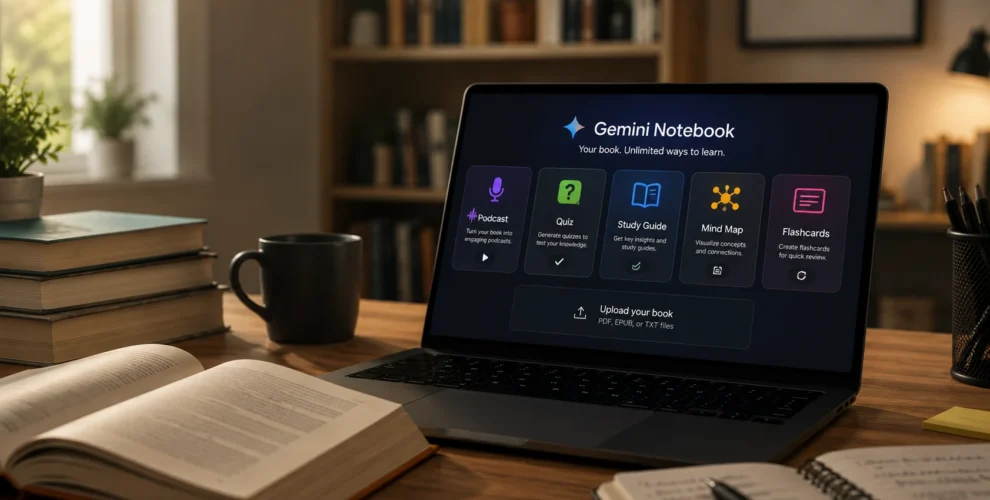
The new feature, called Expert Intelligence, allows eligible ebooks purchased through Google Play Books to become sources inside Gemini Notebook. Users can then ask questions about a book, combine it with other sources, or transform its ideas into formats such as Audio Overviews, infographics and quizzes.
The update essentially turns a purchased book from something you only read into a source you can actively explore with AI.
Key Takeaways
- Google has launched Expert Intelligence for Gemini Notebook.
- Users can add eligible books purchased through Google Play Books.
- More than 100,000 books are supported at launch.
- Gemini can answer questions using the book as a grounded source.
- Books can be transformed into Audio Overviews, infographics, quizzes and other useful formats.
- Multiple books and personal sources can be combined in the same notebook.
- Other users can’t access the contents of a purchased book simply because someone shares a notebook with them.
- Google plans to expand Expert Intelligence beyond books and into more of its AI products.
What Is Expert Intelligence in Gemini Notebook?
Expert Intelligence is a new way to connect professionally published information with Google’s AI tools.
Instead of relying only on documents, websites and other material users manually add, Gemini Notebook can now work directly with supported books from a user’s Google Play Books library.
Once a book is added, Gemini can use its contents as a source when answering questions.
For example, someone reading a management book could ask Gemini how the author’s advice applies to a difficult workplace situation.
A cookbook or nutrition book could be turned into a personalized guide based on the ideas it contains.
What Can Gemini Create From a Book?
The feature goes beyond summarizing chapters.
Google says Gemini Notebook can use supported books to create formats including Infographics, Audio Overviews and Quizzes.
Users can also combine information from a book with their own documents and other sources.
This could be particularly useful for students, researchers and professionals who regularly return to the same reference books.
Instead of searching through hundreds of pages to find a specific idea, they can ask Gemini a question and receive an answer grounded in that source.
Which Books Work With Gemini Notebook?
Google says more than 100,000 books are initially supported.
Participating publishers include Penguin Random House, Macmillan Publishers, Johns Hopkins University Press and O’Reilly Media.
Users can check whether a particular book supports the feature through Google Play Books.
Eligible titles display Gemini Notebook under the book’s “Tools” section.
Do You Need to Own the Book?
Yes.
Google requires users to own an eligible ebook through Google Play Books before they can interact with its full contents inside Gemini Notebook.
Google has also added protections for shared notebooks.
If you share a notebook containing a purchased book with someone who doesn’t own that title, they won’t automatically gain access to the book’s contents. Instead, they will be directed toward Google Play Books if they want to purchase it themselves.
This approach allows Google to add AI features around copyrighted books without simply giving other users free access to the original material.
What Are Featured Notebooks?
Google has also partnered with 15 authors to create Featured Notebooks.
Participating writers include Michael Pollan, Kim Scott, Steven Pinker and Jennifer Wallace. These notebooks can include additional materials and introductions provided by the authors themselves.
The idea is to provide more than an AI summary. Readers can interact with a collection of material organized around an author’s expertise.
Is This Only Available in Gemini Notebook?
For now, Expert Intelligence begins with Gemini Notebook.
But Google has bigger plans.
The company says the feature will eventually expand into the main Gemini app and AI Mode in Google Search.
Google also plans to support additional professional sources, including third-party subscriptions, business research reports and textbooks.
That could eventually turn Gemini into an AI interface for interacting with a much broader collection of trusted, paid information.
Why Is This Update Important?
AI assistants are excellent at quickly finding and organizing information, but users don’t always know where an answer originated.
Gemini Notebook takes a different approach by grounding responses in sources selected by the user.
Adding professionally published books makes that model considerably more useful.
A student could study from a textbook. A manager could consult several leadership books. A developer could reference technical books. Someone learning a new topic could combine multiple authors into one research notebook.
Instead of asking AI to answer from general knowledge, users can effectively say:
“Use these reliable sources to give me a clearer understanding of this issue.”
Conclusion
Google’s Expert Intelligence feature gives Gemini Notebook an interesting new role.
Books are no longer limited to being static reading material. Eligible titles can become interactive AI sources that users can question, analyze and transform into different learning formats.
More than 100,000 books are supported initially, and Google plans to bring the concept to additional content sources and AI products in the future.
If Google expands the idea successfully, Gemini Notebook could evolve from an AI note-taking tool into something closer to a personal library of interactive expertise.
FAQs
1. What is Expert Intelligence in Gemini Notebook?
Expert Intelligence allows users to add eligible books they own through Google Play Books to Gemini Notebook and interact with their contents using AI.
2. How many books support Gemini Notebook?
Google says more than 100,000 books from participating publishers support Expert Intelligence at launch.
3. Can Gemini turn a book into a podcast?
Gemini Notebook can create its Audio Overview format using information from supported books, along with other formats such as quizzes and infographics.
4. Do I need to buy the book first?
Yes. You must own an eligible book through Google Play Books to interact with its contents using Expert Intelligence.
5. Can I combine multiple books in Gemini Notebook?
Yes. Users can combine knowledge from books with other books and their own sources inside a notebook.
6. Is Expert Intelligence coming to Google Search?
Yes. Google plans to expand Expert Intelligence to additional products, including the Gemini app and AI Mode in Search.