
MCP Servers Can Turn Claude Into a Powerful Desktop Automation Tool
Table of Contents
MCP Servers Can Turn Claude Into a Powerful Desktop Automation Tool
Claude is useful for writing, research, and coding, but MCP servers can take it much further by connecting the AI to real tools, files, and applications.
The Model Context Protocol (MCP) allows Claude to interact with external services instead of only responding inside a chat window. With the right MCP integrations, Claude can work with local files, browsers, email, development tools, databases, and other software.
That effectively turns Claude from a chatbot into a more practical desktop automation assistant.
Key Takeaways
- MCP stands for Model Context Protocol.
- It allows Claude to connect with external applications, tools, and data.
- Local MCP servers can give Claude controlled access to files and desktop resources.
- Browser integrations can automate web-based tasks.
- Email integrations can let Claude search, read, draft, and send messages.
- Desktop Commander can provide file, terminal, and process-management capabilities.
- Claude Desktop now supports easier installation of local MCP servers through Desktop Extensions.
- MCP servers should be installed carefully because they may receive access to sensitive data and actions.
What Are MCP Servers?
MCP is an open standard created by Anthropic for connecting AI applications with external tools and information.
Normally, an AI assistant only knows what you provide in the conversation and what its built-in tools allow.
MCP changes that.
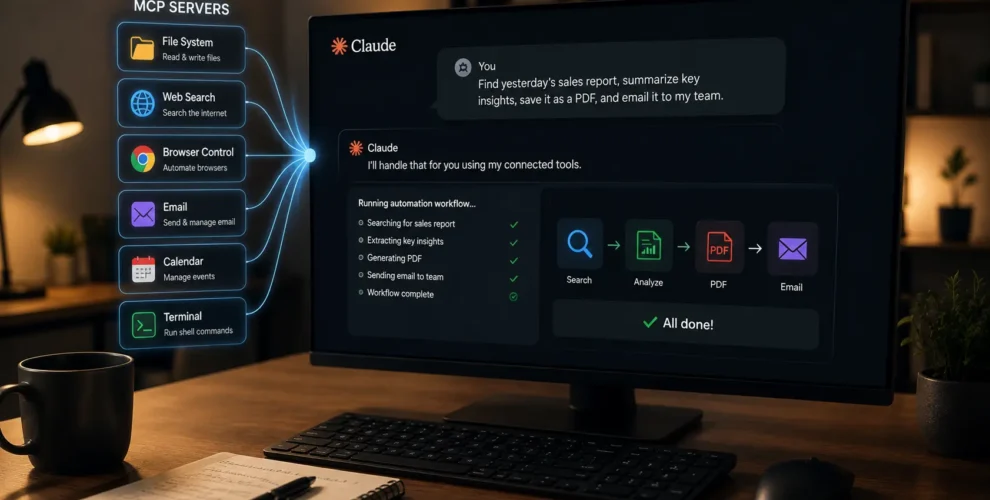
An MCP server acts as a bridge between Claude and another system. Depending on the server and the permissions you provide, Claude can access information or perform actions outside the chat.
For example, instead of uploading a document manually, a filesystem MCP server could allow Claude to read files directly from an approved folder.
How Can Claude Control Local Files?
A filesystem MCP server can give Claude access to selected directories on your computer.
That can allow Claude to perform tasks such as reading documents, creating files, editing content, organizing folders, or working with project files.
Access can be restricted to specific directories rather than giving the AI unrestricted access to the entire computer.
This makes it possible to ask Claude to perform multi-step file tasks using normal language instead of manually opening and editing each file.
Can Claude Automate Browser Tasks?
Browser-connected MCP tools can allow Claude to interact with websites.
Depending on the integration, Claude may be able to open webpages, extract information, navigate between pages, and perform browser-based workflows.
Combined with filesystem access, this becomes more useful.
Claude could potentially gather information from a webpage, process it, and save the result into a local file—all as part of one workflow.
Can Claude Work With Gmail?
Yes, with compatible MCP integrations.
Gmail MCP servers can provide capabilities such as searching emails, reading messages, creating drafts, sending replies, and managing labels.
This means a request such as:
“Look up the most recent emails regarding Project X and write a response.”
can become an actual workflow rather than Claude simply explaining how to do it.
The exact abilities depend on the Gmail MCP server and permissions being used.
What Is Desktop Commander?
Desktop Commander is an MCP server designed to give AI assistants access to more powerful desktop operations.
Its capabilities include terminal commands, process management, and file operations across formats such as text, code, PDF, Word, Excel, images, and structured data.
That can make Claude particularly useful for development and technical workflows.
Instead of manually moving between a terminal, file manager, editor, and Claude, some of those actions can be connected into a single AI-assisted workflow.
Why Are MCP Servers Useful for Automation?
The biggest advantage is combining multiple actions.
A typical chatbot could instruct you on how to finish a task.
An AI connected through MCP can potentially perform parts of that task for you.
For example, a connected Claude workflow could:
Read files → analyze information → run a command → update a document → save the result.
The user describes the desired outcome while Claude coordinates the connected tools.
That’s where MCP becomes more interesting than simply adding another AI feature to an app.
Is Setting Up MCP Getting Easier?
Yes.
Earlier MCP setups often required manually editing configuration files and installing dependencies.
Claude Desktop now supports Desktop Extensions, which package local MCP servers into easier-to-install extensions. Anthropic says they can be installed and managed more like browser extensions through Claude Desktop.
Remote MCP servers are also supported through custom connectors, allowing Claude to connect with internet-hosted services rather than requiring every integration to run locally.
Are MCP Servers Safe?
MCP servers can be powerful, which also means permissions matter.
A server connected to your filesystem, email, browser, or terminal may have access to sensitive information or potentially perform important actions.
Anthropic specifically warns that custom connectors can connect Claude to services that haven’t necessarily been verified. Users should therefore understand what data and actions an MCP server can access before enabling it.
Research has also highlighted prompt-injection and tool-poisoning risks across MCP-enabled AI applications.
For sensitive workflows, it’s better to grant only the permissions actually required.
Why MCP Could Be Important for AI Assistants
MCP represents a shift from AI that answers questions toward AI that can use software to complete work.
Giving Claude access to files, browsers, email, terminals, and other tools makes it possible to automate workflows that would otherwise require jumping between several applications.
The important part isn’t any single MCP server.
It’s the ability to connect multiple tools under one AI interface.
Conclusion
MCP servers can dramatically expand what Claude can do on a desktop.
With the right integrations, Claude can work with files, browse websites, interact with email, execute commands, and coordinate multi-step workflows.
The result is something closer to a desktop automation agent than a traditional chatbot.
The tradeoff is access: the more tools Claude can control, the more important permissions and security become.
FAQs
1. What is an MCP server?
An MCP server connects an AI application such as Claude with external tools, applications, or data using the Model Context Protocol.
2. Can MCP let Claude access computer files?
Yes. Filesystem MCP servers can give Claude controlled access to specific folders and files on a computer.
3. Can Claude control desktop applications?
MCP integrations and Claude’s desktop capabilities can connect it with local resources and certain applications, depending on the tools and permissions configured.
4. Can Claude automate Gmail?
Compatible MCP servers can allow Claude to perform actions such as searching, reading, drafting, replying to, and sending emails.
5. What is Desktop Commander MCP?
Desktop Commander is an MCP server providing capabilities including terminal commands, process management, and file operations.
6. Are MCP servers safe to use?
They can be, but users should carefully review permissions and use trusted servers because MCP integrations may gain access to sensitive files, accounts, or actions.
Want to keep up with our blog?
Our most valuable tips right inside your inbox, once per month.


Next