ChatGPT Can Now Send Apple Messages for You on Mac
Table of Contents
ChatGPT Can Now Send Apple Messages for You on Mac
ChatGPT can now help Mac users manage conversations in Apple Messages without manually switching between chats.
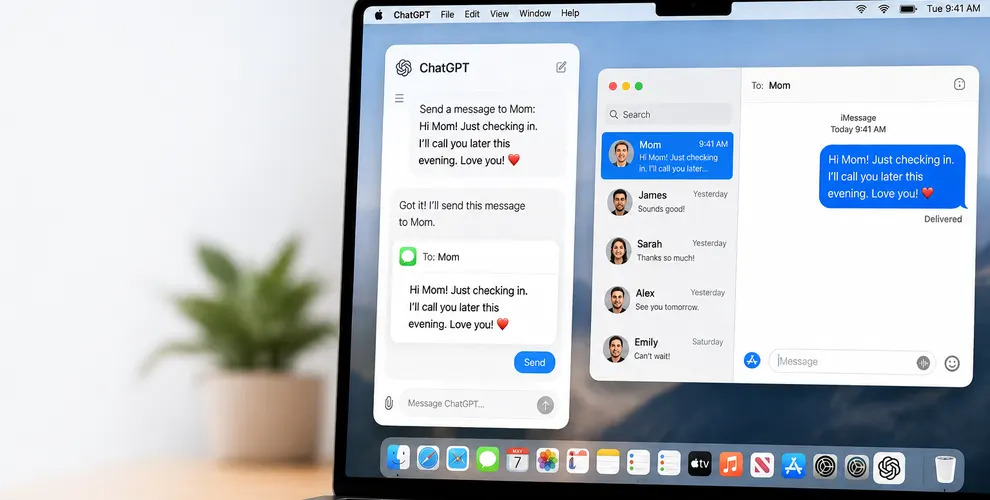
OpenAI has introduced an Apple Messages plugin that lets ChatGPT find conversations, read messages, prepare replies, and send them through the Messages app. The integration supports iMessage, SMS, and RCS conversations on compatible Macs.
The feature moves ChatGPT closer to becoming an assistant that can handle everyday communication, rather than simply helping you write a reply that you then have to copy and send yourself.
Key Takeaways
- ChatGPT now has an Apple Messages plugin for Mac.
- It can find, read, and search your Messages conversations.
- ChatGPT can draft replies based on the conversation.
- It can send messages through Apple’s Messages app.
- The integration works with iMessage, SMS, and RCS conversations.
- By default, you must approve the message and recipients before ChatGPT sends anything.
- The plugin is available across ChatGPT plans on supported Apple silicon Macs.
- It works through ChatGPT Work and Codex, not ordinary ChatGPT chats.
What Is the ChatGPT Apple Messages Plugin?
The ChatGPT Apple Messages plugin connects ChatGPT with the Messages app on your Mac.
Once connected, you can ask ChatGPT to work with conversations already stored in Messages.
For example, instead of opening several conversations to find something someone sent earlier, you could ask ChatGPT to search those messages. It can also use the conversation to prepare an appropriate response.
This makes Apple Messages another source ChatGPT can work with while completing tasks.
What Can ChatGPT Do With Apple Messages?
The integration covers several useful communication tasks.
ChatGPT can find conversations, search messages, read existing chats, summarize what was discussed, prepare responses, and send messages through the Messages app.
This could be useful when you have a long conversation and want a quick summary before replying.
It could also reduce repetitive work. Instead of searching for a particular detail, writing a response, and switching between applications, you can ask ChatGPT to help with more of the process.
Can ChatGPT Actually Send a Message for You?
Yes.
This is one of the biggest differences between the new integration and simply asking ChatGPT to write a text.
The plugin can send the finished response through Apple Messages after preparing it.
There is an important safeguard, however.
ChatGPT asks you to approve both the message and its recipients before sending by default. This gives you an opportunity to check what is being sent and make sure it is going to the correct person.
Does It Work With SMS and RCS?
Yes.
The integration isn’t limited to Apple’s iMessage service. OpenAI says it can work with iMessage, SMS, and RCS conversations available through Messages on the Mac.
That makes the feature more useful for conversations involving people who aren’t necessarily using Apple devices.
Where Can You Use the Apple Messages Plugin?
The plugin is available through the ChatGPT desktop app for macOS on supported Apple silicon Macs.
OpenAI says it can currently be used with ChatGPT Work and Codex. It isn’t available for use inside regular ChatGPT conversations.
OpenAI lists the Apple Messages plugin as available across ChatGPT plans in its macOS desktop experience.
What About Message Privacy?
Connecting an AI assistant to private conversations naturally raises privacy questions.
The integration requires access to Messages so ChatGPT can perform the tasks you request. The ability to send messages also means users should pay attention to what permissions they grant.
The default confirmation step is particularly important. It prevents ChatGPT from normally sending a prepared message without first showing you the message and intended recipients.
OpenAI also warns users to understand the risks associated with persistent approvals. In managed workspaces, administrators can disable Apple Messages access through existing computer-use controls.
Why Is This ChatGPT Update Important?
The bigger story is that ChatGPT is gradually moving from creating information to acting on it.
Writing a suggested reply is useful. Finding the right conversation, understanding its context, preparing the response, and sending it after approval removes several additional steps.
Messages is also a particularly personal application to integrate with an AI assistant. How people respond to the feature may therefore provide an interesting test of how comfortable users are giving AI access to everyday communication.
Conclusion
The ChatGPT Apple Messages plugin makes ChatGPT more useful for communication on Mac by allowing it to search conversations, understand existing messages, draft replies, and send texts after approval.
It is a relatively simple integration, but it represents a bigger change in how ChatGPT works. Instead of only telling you what to write, ChatGPT can now help complete the communication task itself.
FAQs
1. Can ChatGPT send Apple Messages?
Yes. ChatGPT can prepare and send messages through Apple’s Messages app using the new Apple Messages plugin.
2. Does ChatGPT send messages without asking?
By default, no. ChatGPT asks you to approve the message and its recipients before sending it.
3. Can ChatGPT read existing iMessages?
Yes. The plugin can read and search conversations available through Apple Messages when you give it the required access.
4. Does the ChatGPT Apple Messages plugin support SMS and RCS?
Yes. OpenAI says the integration supports iMessage, SMS, and RCS conversations through Messages.
5. Can I use the Apple Messages plugin on Windows?
No. The current Apple Messages integration is designed for the ChatGPT desktop app on compatible Macs.
6. Is the Apple Messages plugin available in normal ChatGPT chats?
No. OpenAI currently says the plugin can be used in ChatGPT Work and Codex, rather than regular ChatGPT conversations.